WiFi Guest Email Capture Device
Automatically capture every guest's email when they connect to your vacation rental WiFi. Build your direct booking list with one simple device. Works with Airbnb, VRBO, and all short-term rentals.
+ $9/mo subscription
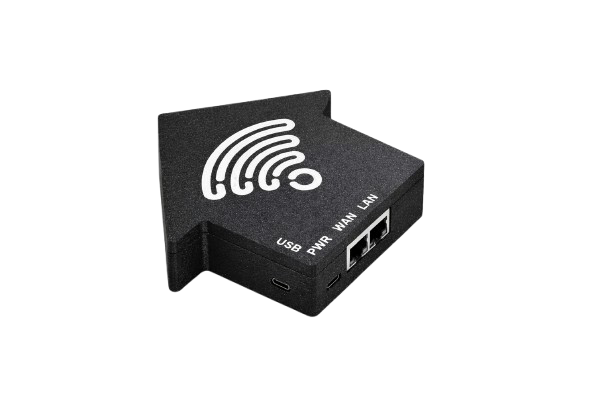
How the WiFi Captive Portal Captures Guest Emails
A simple plug-and-play device that creates a branded splash page for your vacation rental WiFi
Captive Portal
When guests connect to WiFi, they see your branded portal and enter their email. Works automatically with any device.
Cloud Dashboard
Guest data syncs automatically to your dashboard. Export contacts anytime as CSV for your email marketing.
5-Minute Setup
Plug into power and your router, run the setup wizard. No technical skills needed. Works with eero, UniFi, TP-Link and more.
Technical Specifications
Everything you need to know
| Connectivity | Ethernet (cable included) |
| Router Compatibility | Amazon eero, TP-Link Deco, TP-Link Omada, Aruba, UniFi and more |
| Power | USB-C (adapter included) |
| Setup Time | 5-10 minutes |
| Data Captured | Email, Name (optional), Visit Count |
| Cloud Sync | Real-time, automatic |
| Portal Customization | Property Name, Backround Image, Welcome Message |
| Email Validation | 3rd Party verification |
| Export | CSV download anytime |
| Warranty | 2 years |
| Shipping | Free in US (2-3 days) |
Requires $9/month cloud subscription per property
Frequently Asked Questions
Common questions about WiFi guest email capture for vacation rentals
How does the Ping Guest Beacon capture guest emails?
When guests connect to your property's WiFi, they're shown a branded captive portal (splash page) where they enter their email to get internet access. The beacon captures this data and syncs it to your cloud dashboard automatically. This works with any device - phones, tablets, laptops.
What routers are compatible with Ping Guest Beacon?
The Ping Guest Beacon works with most popular routers including Amazon eero, TP-Link Deco, TP-Link Omada, Aruba, Ubiquiti UniFi, and many more. It connects via ethernet cable to your existing router - no need to replace your current WiFi setup.
How long does it take to set up the beacon?
Setup takes just 5-10 minutes. Simply plug the beacon into power using the included USB-C adapter, connect it to your router with the included ethernet cable, then follow the setup wizard on your phone. No technical skills required.
Does this work with Airbnb and VRBO guests?
Yes! The beacon captures emails from all guests who connect to WiFi, not just the person who booked. This helps vacation rental hosts build their own email list for direct booking marketing, reducing reliance on OTA platforms like Airbnb and VRBO.
What is the monthly subscription for?
The $9/month subscription covers cloud hosting for your dashboard, automatic data sync from the beacon, email validation to ensure you're getting real addresses, and ongoing software updates. One subscription covers one property.
How is this different from StayFi or other WiFi marketing solutions?
Ping Guest is designed specifically for independent vacation rental hosts who want a simple, affordable solution. We focus on the core feature - capturing guest emails - without the complexity of larger enterprise systems. One device, one price, unlimited contacts.
Can I customize the WiFi splash page with my brand?
Yes! You can customize your captive portal with your property name, a background image, and a custom welcome message. This creates a professional, branded experience for your guests when they connect to WiFi.
Ready to start capturing guest emails?
Order your beacon today. Ships in 2-3 business days with free US shipping.
Hardware
$99
one-time
Subscription
$9/mo
per property
30-day money-back guarantee